
Analytical Review: Microsoft CoPilot vs OpenText Aviator
Compare CoPilot against the new kid in town, OpenText Aviator. Both are AI, both have document and data retrieval and analysis at their core.
Think of the current enterprise AI landscape as a high-end garage.
On one side, you’ve got Microsoft Copilot: a sleek, Swiss Army knife sports car. It’s sitting right in your driveway, ready to turn on with a button click, and designed to make your everyday life feel effortless.
On the other side, you’ve got OpenText Aviator: a heavy-duty industrial monster. It’s not meant for a quick run to the grocery store, but if you need to haul ten tons of legal contracts out of a deep digital quarry without dropping a single page, nothing else comes close.
Both of these tools leverage artificial intelligence to help companies work smarter with their data. But they were built for completely different jobs, and they talk to your files in totally different ways.
If you're trying to figure out which tool does what, where they get stuck, and which one actually gets its facts straight, here is a layman's breakdown.
Before diving into the technical plumbing, let's look at what each platform is actually trying to accomplish.
Microsoft CoPilot - The everyday helper
Lives right inside MS Office and Teams
Focus on person productivity
Great for summarising, meeting notes, drafts, emails, looking for stuff
Quick to learn, almost no setup for users
OpenText Aviator - The deep archive specialist
Lives deep inside complex filing systems
Focus on heavy sets of records and files
Great for audits, compliance, legal and ensuring adherence to policies
Enterprise setup and governance
What Are They, Really?
Let's compare where each tool succeeds and flourishes.
Microsoft CoPilot
Microsoft CoPilot is all about personal productivity. If your company uses Microsoft 365, CoPilot is already sitting right inside the apps you open every morning—Word, Excel, PowerPoint, Outlook, and Teams.
Its goal is simple: eliminate boring, repetitive tasks so you can get home on time. It listens in on your video calls, reads through your cluttered inbox, and drafts documents so you don't have to stare at a blank page.
Instant Desktop Help: It sits right where you work. You can open a blank PowerPoint deck and type, "Make me a 5-slide presentation based on this Word document," and it just builds it.
Meeting Summaries: Missed a 45-minute Teams meeting? CoPilot can give you a bulleted list of who said what, what decisions were made, and what action items were assigned to you.
Low Learning Curve: If you know how to send a chat message, you already know how to use CoPilot. There is practically no training required for basic tasks.
OpenText Aviator
OpenText is a giant in the world of Enterprise Information Management (EIM). In plain English, they build the digital vaults where huge corporations store millions of sensitive files—like legal contracts, HR records, insurance claims, and supply chain invoices.
OpenText Aviator isn't a single chat box; it’s a family of specialized AI agents (like Content Aviator, IT Operations Aviator, and Business Network Aviator). It doesn't care about helping you write a casual email to a coworker; it cares about finding exact, needle-in-a-haystack information buried inside decades of corporate files.
Navigating Complex Archives: Aviator thrives inside massive, heavily structured record systems where files are tagged with strict metadata, categories, and tracking numbers.
Rock-Solid Data Privacy: Aviator is built for companies that are terrified of data leaks. It can run in completely private cloud environments where no corporate data ever touches public AI systems.
Specialized Business Workflows: It can look across an entire supply chain workspace, connect an incoming PDF invoice to a specific purchase order in SAP, and verify if the terms match the master contract signed three years ago.
What they do best
No AI is perfect, and both of these tools have clear weaknesses depending on how you try to use them.
Where Microsoft CoPilot gets stuck
The "Over-Sharing" Trap: Copilot relies on your company's existing Microsoft permissions. If your IT department hasn't locked down sensitive folders, CoPilot might accidentally reveal private HR notes or executive salary plans in search results to regular employees.
Shallow External Connections: Copilot loves Microsoft files (Word, SharePoint, Outlook). If you try to make it dig deep into non-Microsoft software—like specialized databases or legacy mainframe tools—it requires custom setups that don't always work seamlessly out of the box.
Precision Math & Fine Details: CoPilot is an expert at summarizing long conversations, but if you ask it to perform complex data extraction across a massive stack of nested spreadsheets, it can occasionally misinterpret numbers or hallucinate details.
OpenText Aviator
Not as Friendly for Casual Users: Aviator doesn't live inside your casual desktop apps in the same intuitive way. You often have to interact with it inside specialized enterprise portals, web dashboards, or custom business apps.
Requires Heavy IT Setup: You can't just flip a switch and start using Aviator. It requires a mature, well-organized OpenText environment, meaning your IT team has to do real prep work to map out permissions and data pipelines.
Overkill for Small Needs: If all your team wants to do is polish up blog posts or draft routine customer emails, Aviator is way too complex and expensive for the job.
What they struggle
An AI tool is only as smart as the data you feed it. How these two platforms connect to your company's software is one of their biggest differences.
Microsoft Copilot’s Approach: The Cloud Ecosystem
Microsoft uses a central engine called the Microsoft Graph. Think of the Graph as a giant index map of everything you do inside Microsoft 365—your chats, emails, calendar events, and files.
When you ask Copilot a question, it queries this central map. If you want Copilot to know about data outside of Microsoft (say, your customer tickets in ServiceNow or Jira), you have to use Graph Connectors to copy or index that outside data into Microsoft's system. It works well, but it means moving your data into Microsoft's orbit.
OpenText Aviator’s Approach: The Governed Data Layer
OpenText takes the opposite route. Instead of forcing you to move your files into a central cloud index, Aviator uses an advanced engine called IDOL to read data right where it lives.
Whether your files are stored in an on-premises server room, an old Documentum vault, an SAP system, or a cloud platform, Aviator connects directly to them. More importantly, it pays attention to context. It knows that "Document A" isn't just a random PDF—it's a legally binding contract attached to "Customer B" under "Project C." That extra layer of context keeps search results organized.
Fun Fact: You don't always have to pick one over the other! OpenText created an integration called Content Aviator for Microsoft 365 Copilot. This lets an employee ask a question inside Microsoft Teams, while Copilot quietly reaches behind the scenes into OpenText’s secure vault to grab the right answer.
Integration
When an AI makes up a fake fact, it’s called a hallucination. In a casual chat, a hallucination is annoying. In an enterprise setting—like checking a drug safety protocol or verifying a legal liability clause—a hallucination can be disastrous.
Here is how both systems handle data accuracy:
Getting the right answer
Why Copilot Sometimes Struggles with Exact Answers
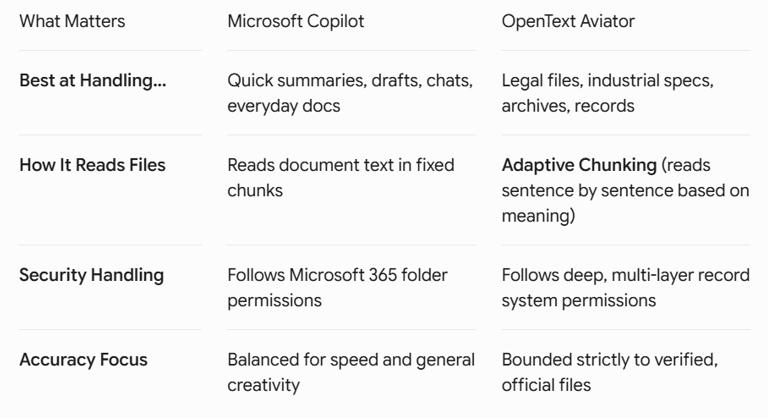
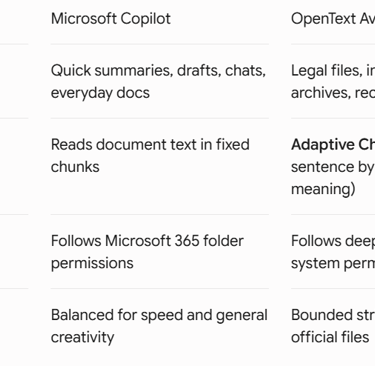
Copilot uses standard search methods. If you ask it a question, it scans your cloud documents for matching words and summarizes what it finds.
However, if your company’s SharePoint is messy—full of duplicate files named Project_Draft_v1, Project_Draft_v2, and FINAL_Project_Draft—Copilot might pull information from an outdated draft and present it as fact. It trusts whatever text it finds first.
Why Aviator Focuses heavily on Precision
Aviator avoids this problem using two main tricks:
Adaptive Chunking: Instead of breaking a document into arbitrary chunks of text, Aviator analyzes sentences based on their actual meaning. It doesn't break up complex clauses mid-thought.
Workspace Grounding: You can lock Aviator's search boundary strictly to an official folder—for instance, "Only search inside the '2026 Approved Audits' workspace." By completely ignoring unverified drafts or casual chats, it delivers pinpoint answers backed up by direct links to the source file.
If you're trying to figure out which tool your business needs, here is the quick bottom line:
Get Microsoft Copilot if: You want to make your workforce faster at their day-to-day jobs. It is the absolute king of drafting emails, creating slide decks, summarizing video meetings, and keeping daily desk work moving smoothly.
Get OpenText Aviator if: You are running a complex, highly regulated enterprise where losing track of legal records, technical manuals, or supply chain contracts carries massive financial or regulatory risks.
In the modern enterprise, these two systems rarely fight for the same ground. Instead, Copilot handles the fast-paced front office, while OpenText Aviator protects and organizes the heavy back office.
The Verdict
Start Doing AI
Go to
© 2026 Start Doing AI. Not affiliated with Microsoft or Google
Contact: info@startdoingai.com
Phone: 07891234728